The AMDB Generator is built on the AIXM Software Development Kit. The AIXM Origination Engine generates the AIXM elements from AMDB templates, the AIXM Reader manages the baseline and exports, Geo Core provides the geodetic calculations, and the AIXM Origination Components with the map platform provide the forms, workspaces, drawing, snapping and GIS import.
Powered by AIXM Software Development Kit
Product Overview
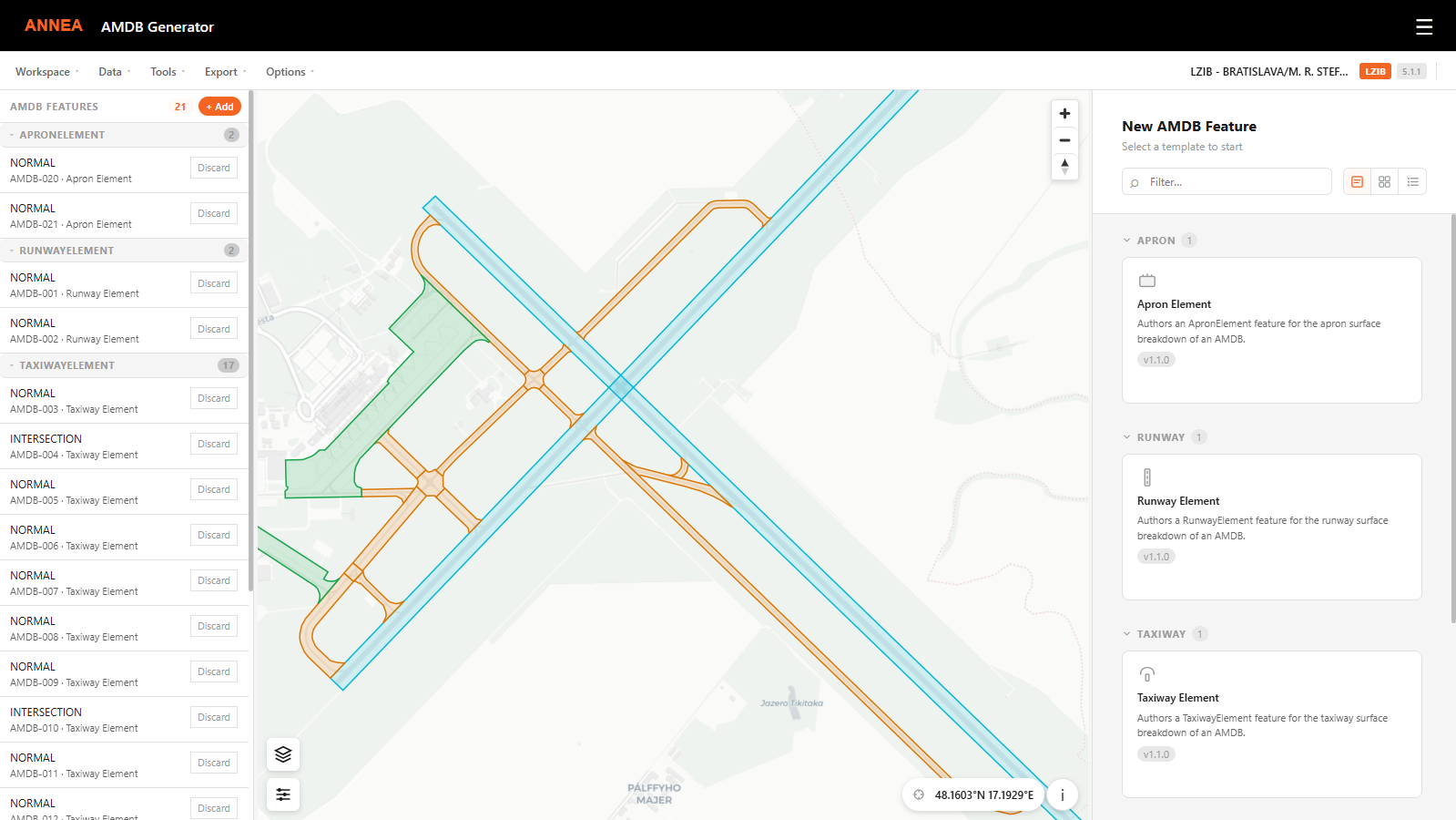
Aerodrome mapping data is detailed, geometry-heavy and closely linked to the rest of the aeronautical dataset. The AMDB Generator lets aerodrome and AIS teams capture this data in a map-first web application, using the same template-driven origination approach as our Digital NOTAM application.
Every element is created against the AIXM baseline, so references to airports, runways, taxiways and aprons are always valid. Geometry can be drawn with precise CAD-style tools, typed as coordinates or taken from existing GIS data, and the attributes are entered in guided forms rather than raw XML.
Regulatory Alignment and Software Assurance
The ANNEA AMDB Generator is production-grade software developed in line with the software safety assurance guidance of EUROCAE ED-153. It supports organisations in addressing applicable aeronautical data quality requirements of Commission Implementing Regulation (EU) 2017/373 and the aerodrome mapping data provisions of ICAO Annex 14, Annex 15 and PANS-AIM.
Its structured, data-centric approach supports the preparation of aerodrome mapping data for workflows based on EUROCAE ED-99D / RTCA DO-272D and EUROCAE ED-119C / RTCA DO-291C. Guided data capture, geometry editing and AIXM 5.1.1 export provide a foundation for applying the EUROCONTROL Supporting Material for Aerodrome Mapping Data Sets.
Key Benefits
- Faster Data Capture: Reuse existing survey and GIS data instead of re-digitising aerodrome surfaces by hand.
- Consistent Data: Guided forms, controlled code lists and baseline references keep element attributes complete and correct.
- Precise Geometry: Snapping, vertex editing and coordinate entry deliver accurate, well-connected surface polygons.
- AIXM-Ready Output: Export changes or complete datasets that load directly into your AIM system.
Core Capabilities
Aerodrome Workspaces
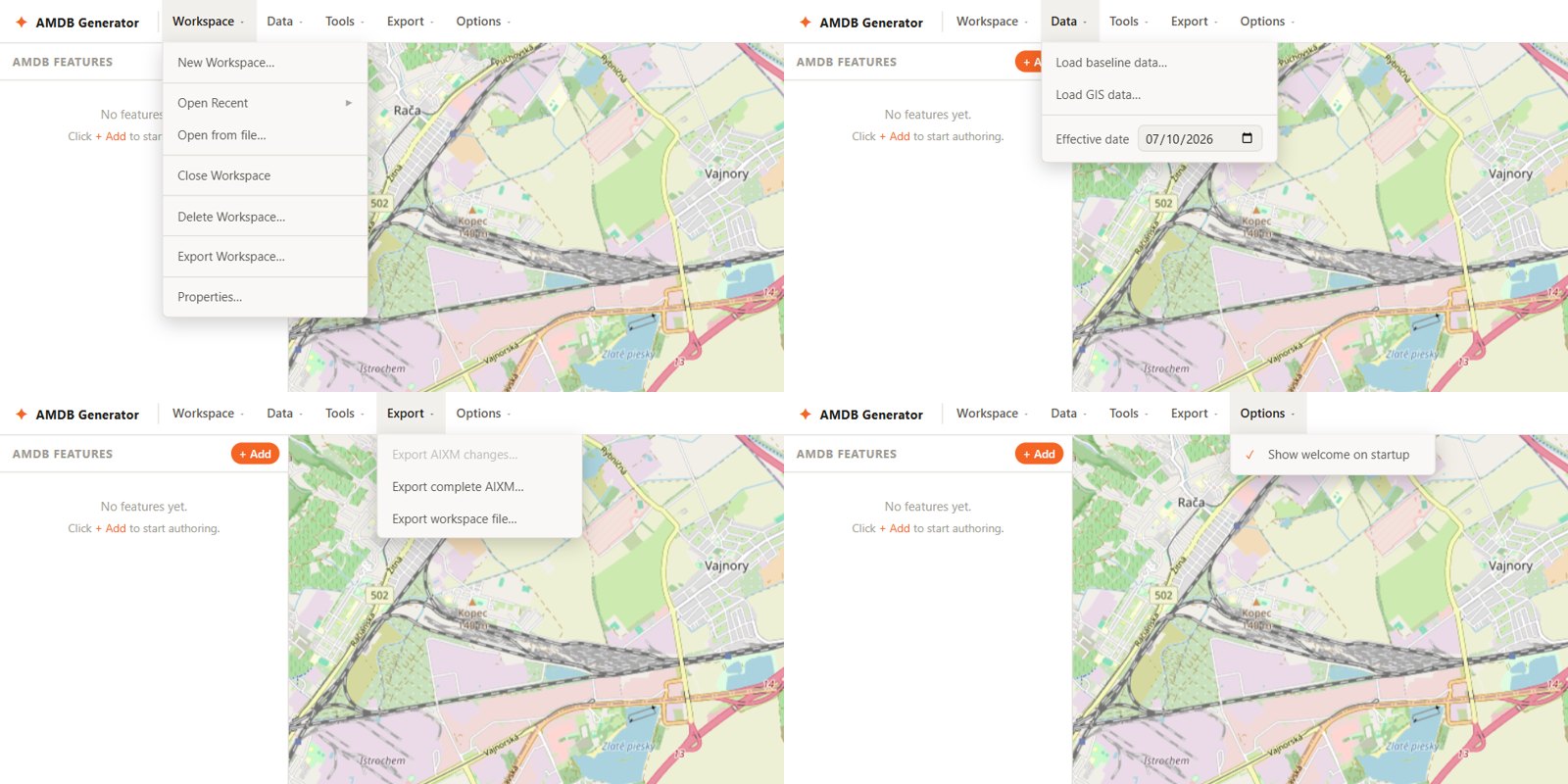
Work is organised in workspaces, one per aerodrome. Each workspace holds a draft change set over the baseline dataset, with the selected airport and effective date, and is saved automatically.
- Create a workspace for an airport from the baseline or for a new airport
- Open recent workspaces, edit properties or delete them
- Exchange workspaces between colleagues as workspace files
- Load AIXM baseline datasets that remain available between sessions
Aerodrome Surface Elements
Templates guide the user through each element type, with required fields, controlled values and reference lookups to the baseline.
- Runway elements: normal, intersection, displaced and shoulder elements, with dimensions, grade separation and AMDB designators
- Taxiway elements: normal, intersection, shoulder and holding bay elements
- Apron elements: parking, ramp, cargo, fuel, hardstand, maintenance, military, taxilane and other apron types, including servicing facilities such as jetways, towing, docking and ground power
- Surface properties: composition, preparation, condition and pavement classification (PCN)
- Availability: operational status and warnings such as work in progress or bird hazard
- Base features: airports and runways when they are not yet part of the baseline
Map Editing Tools
A full geometry editor works directly on the map, with the baseline, the workspace and imported GIS data shown as separate layer groups.
- Polygon drawing and vertex editing with numbered vertices
- Move, rotate and scale of whole geometries
- Seven snapping modes: endpoint, midpoint, nearest point on line, node, centre, intersection and perpendicular
- Snapping to baseline features, other workspace elements and imported GIS data
- Undo and redo of drawing steps and typed coordinates
- Two-way link between the map and the coordinate text in the form
- Layer control with visibility, labels and snap settings per layer, and features colour-coded by type
GIS Data Import
Existing survey and GIS data becomes the starting point for new elements. Imported features are shown as their own map layers, and any imported shape can be assigned to the geometry of the element being edited.
- Shapefile, GeoJSON, KML and KMZ import
- Multipart geometries are split into individual parts automatically
- Features already used are marked, so nothing is captured twice
Custom Map Backgrounds
Accurate aerodrome mapping needs the right reference imagery. Besides the standard street and dark base maps, the AMDB Generator accepts custom backgrounds from your own sources, such as orthophotos or aerodrome charts published as map services.
- XYZ tile services, WMS services and vector style definitions
- Adjustable opacity to trace imagery underneath the data
- Cursor coordinate readout and "go to coordinate" navigation
AIXM Export
Results are exported as AIXM 5.1.1, ready for loading into AIM and AMDB systems.
- Changes only: an AIXM update message containing the new and modified elements
- Complete dataset: the baseline with all workspace changes applied
- Deterministic output: the same workspace always produces the same XML
- Automatic detection and repair of conflicting GML identifiers
- Elements with errors are clearly reported before export
Licensing and Deployment
Software as a Service (SaaS)
ANNEA hosts, operates and maintains the application using established global cloud providers with ISO 27001-certified services and independent SOC 2 assurance reports. The service includes security controls, backups and ongoing maintenance, with a 99.9% availability target subject to the agreed service-level terms.
On-Premises Deployment
The application can be deployed within your organisation's infrastructure and hosted, operated and maintained by your own team. Support and maintenance arrangements can be tailored to your requirements.
See It in Action or Try It Yourself. Book a live demonstration with our team, or request access to the demo version and explore the AMDB Generator at your own pace with prepared sample data. Once your access is activated, simply sign in to the Annea Apps Portal and start the application. Demo versions are intended for evaluation only.
Copyright
Annea s.r.o.