All applications of the Annea AIXM Origination Suite are built on the AIXM Software Development Kit. The AIXM Reader manages the baseline data, the AIXM Origination Engine generates and validates the AIXM output, Geo Core calculates every geometry, and the AIXM Origination Components provide the forms, map editing and workspace tools.
Powered by AIXM Software Development Kit
One Approach, Focused Applications
Originating aeronautical data is about more than filling in fields. Every change must reference the right features, carry correct geometry and timing, and result in data that downstream systems accept. The Annea AIXM Origination Suite lets your specialists concentrate on the operational content, while the applications take care of the data model. All applications share the same foundation, so they work the same way and deliver data of the same quality.
How It Works
Whatever the application, creating new aeronautical data follows the same six steps:
-
Pick a template
Choose the task from a catalogue: closures, obstacles, navaids, aerodrome elements and more.
-
Fill in the form
A guided form with only the relevant fields, units and schedules.
-
Find references
Look up the affected airport, runway or navaid in your data, from a list or on the map.
-
Accept proposals
Affected FIRs and related values are proposed automatically for your review.
-
Draw or import geometry
Draw on the map with snapping, type coordinates or reuse GIS data.
-
Check and deliver
Validated AIXM, exported or sent via SWIM, B2B or e-mail, with NOTAM text where needed.
Depending on the application: workspaces for larger sets of changes · direct AIXM editing for experts · review and approval workflows · event lifecycle and NOTAM publication
Capabilities
Simple Forms Instead of Raw AIXM
Every task starts from a template that presents only the fields that matter, in plain operational language, with drop-down lists for coded values and help where it is needed. The complexity of the AIXM model stays hidden behind the form.
Complex Features in One Step
A single form can create several related features at once, for example a navaid together with all its equipment, such as a VOR/DME with its VOR and DME components. Repeating entries, such as a list of obstacles or a series of points, are entered in a table, so many features are created from one simple form.
Templates Tailored to You
Templates can be adapted to your local rules, terminology and working procedures, or created for new scenarios and feature types. Mandatory fields, default values and checks are configured, not programmed, and new templates are rolled out without updating the applications.
Your Data as the Starting Point
Load your current AIXM dataset as the baseline. Existing airports, runways, airspaces or navaids are found by name or picked on the map, and values such as affected FIRs or identifiers are proposed automatically for you to accept or adjust.
Reuse of GIS Data
Load Shapefile, GeoJSON, KML/KMZ or GeoPackage files next to the AIXM data. Survey results, CAD exports or other GIS layers are shown on the map and can be picked directly as the geometry of a new feature or used as a reference to snap to while drawing.
Precise Geometry, Your Way
Draw points, lines, polygons and circles on the map with snapping to existing features, or type coordinates in familiar formats, including arcs, circles and state border segments. Custom background maps such as orthophotos or charts provide the right reference.
Checked Before It Leaves
Missing values, invalid references and inconsistent entries are detected while you work and highlighted where they need to be fixed, so only complete and consistent data is exported or submitted.
Organised Work
The applications run in any modern web browser, with nothing to install. Changes are collected in workspaces, saved automatically and reviewed on the map before export. Workspaces can be exported and shared with colleagues, and long-running work can be picked up again at any time.
Ready-to-Use Results
Export standard-compliant AIXM, either as the changes only or as a complete updated dataset, ready to load into your AIM system. Where your operations need them, text products such as NOTAM and SNOWTAM are produced from the same data.
Workflows That Match Your Procedures
Review and approval steps follow your organisation's procedures. Stages, mandatory transitions and responsibilities are configurable, roles separate originators, reviewers and approvers, and every step is recorded in an audit trail.
Distribution Where It Is Needed
Approved data is delivered through SWIM services, with built-in connectivity to EUROCONTROL AIMSL, through custom B2B interfaces to national or partner systems, or by e-mail with the files and text prepared automatically.
Integrated With Your Systems
The applications are prepared for integration with existing AIM, NOTAM and GIS systems, from exchanging baseline data and results to embedding origination directly into your own applications through the AIXM Origination Components.
Applications
SaaS or On-Premises
DNOTAM
Digital NOTAM Origination
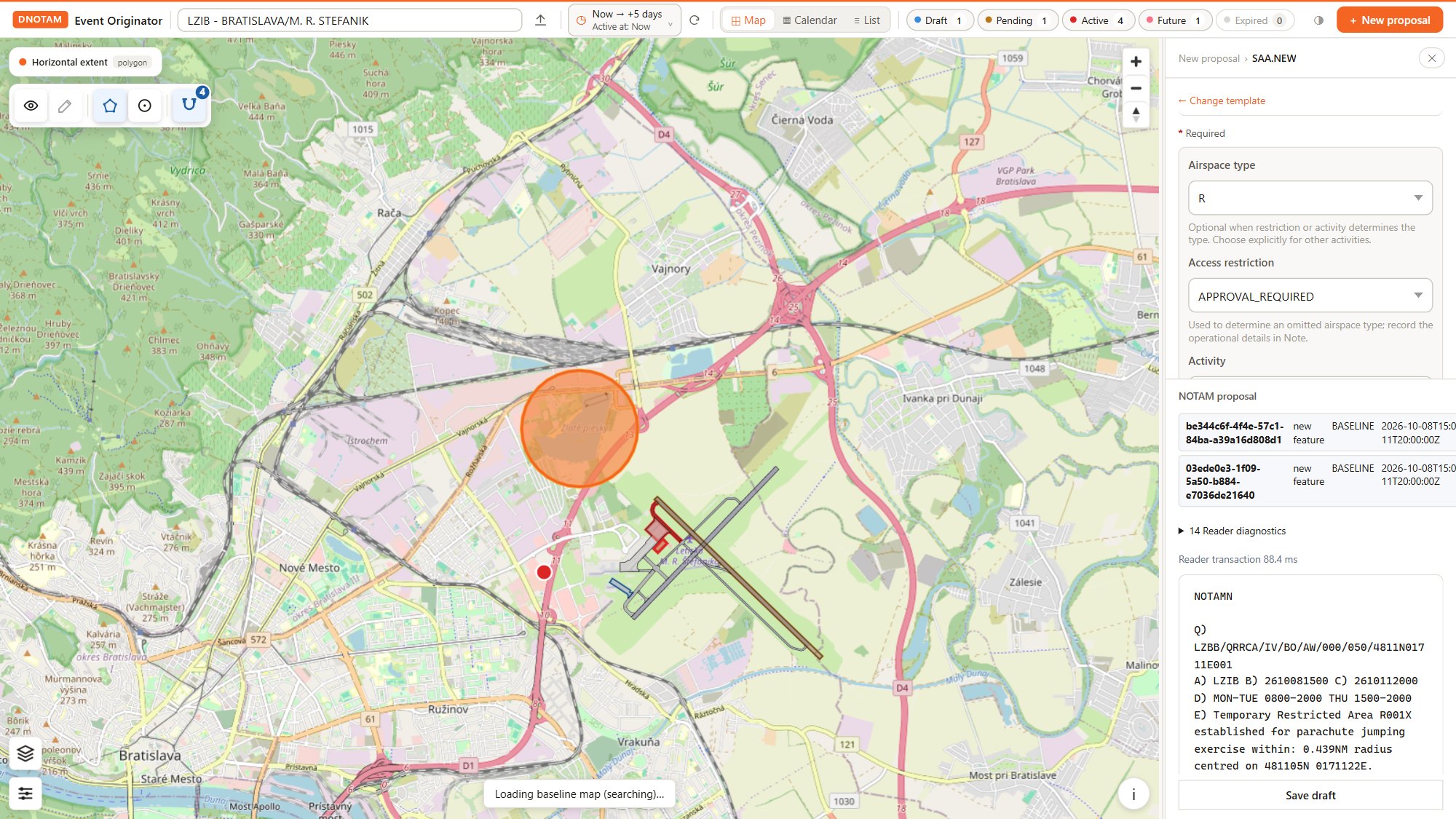
Create, validate, approve and distribute aeronautical events. Covers all EUROCONTROL Digital NOTAM Event Specification 2.0 scenarios, generates ICAO NOTAM and SNOWTAM text automatically, and manages each event from draft to publication, change and cancellation, with SWIM distribution.
SaaS or On-Premises
AMDB
AMDB Generator
Originate and edit Aerodrome Mapping Database elements on the map. Draw or import runway, taxiway and apron elements, attribute them with guided forms, trace custom background imagery and export the result as AIXM changes or a complete dataset.
More Origination Apps Are on Their Way. The suite is growing. Upcoming applications will bring the same simple, template-driven approach to further areas of aeronautical data, such as AIP data, obstacle data and the digitisation of existing data sources. Tell us what you need and help shape the next additions.
Licensing and Deployment
Software as a Service (SaaS)
ANNEA hosts, operates and maintains the application using established global cloud providers with ISO 27001-certified services and independent SOC 2 assurance reports. The service includes security controls, backups and ongoing maintenance, with a 99.9% availability target subject to the agreed service-level terms.
On-Premises Deployment
The application can be deployed within your organisation's infrastructure and hosted, operated and maintained by your own team. Support and maintenance arrangements can be tailored to your requirements.
See It in Action or Try It Yourself. Book a live demonstration with our team, or request access to the demo version and explore the applications at your own pace with prepared sample data. Once your access is activated, simply sign in to the Annea Apps Portal and start the applications. Demo versions are intended for evaluation only.
Copyright
Annea s.r.o.