Digital NOTAM Origination is built on the AIXM Software Development Kit. The AIXM Origination Engine turns Digital NOTAM templates into AIXM 5.1.1 events and NOTAM and SNOWTAM text, the AIXM Reader keeps the aeronautical baseline, Geo Core calculates geometries and NOTAM Q-circles, and the AIXM Origination Components provide the forms, map, event views and workflow.
Powered by AIXM Software Development Kit
Product Overview
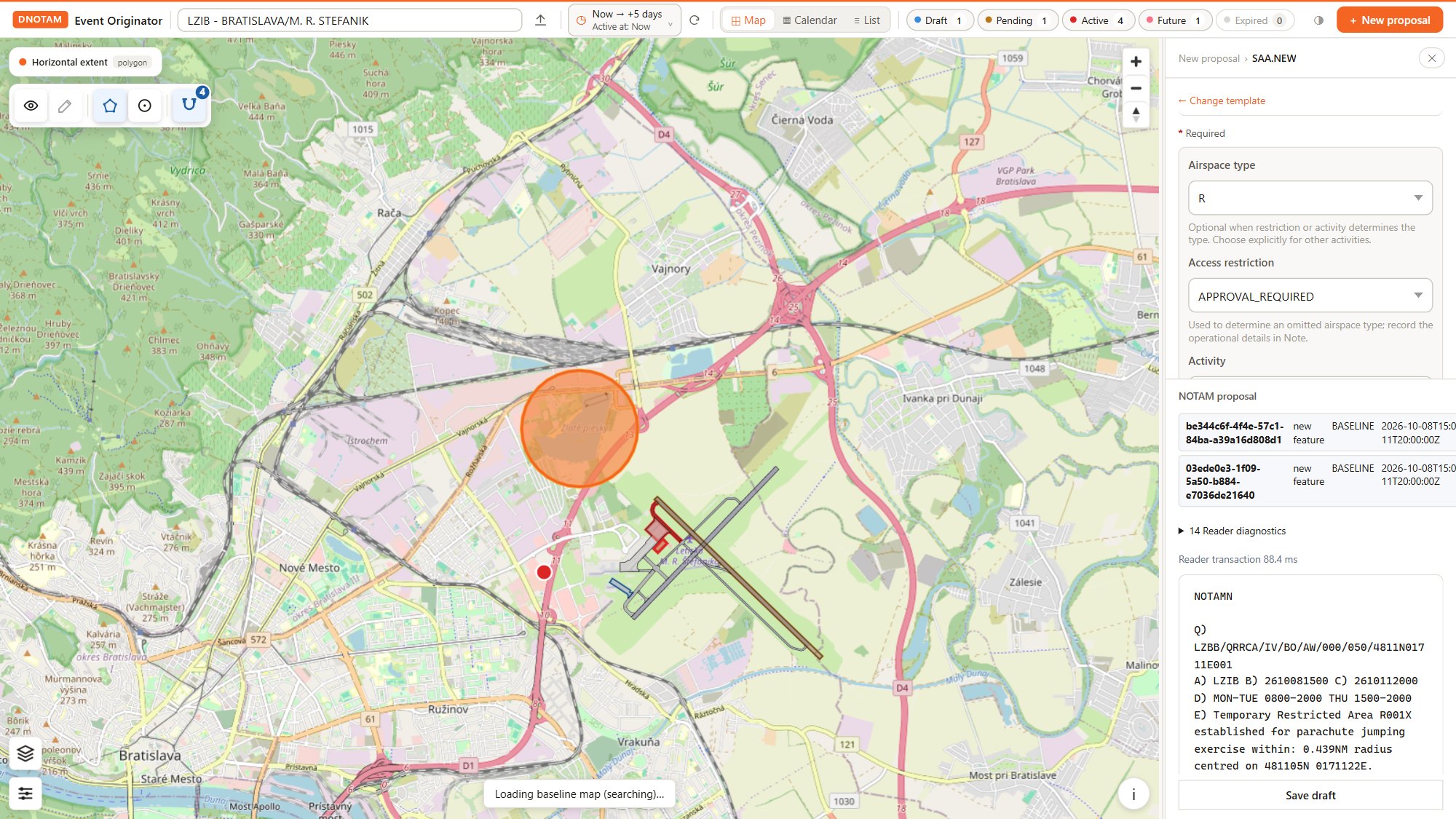
The Digital NOTAM Origination Application brings AIXM baseline data, scenario templates, interactive mapping and approval workflows together in one workspace. Operators describe an operational change once, in a structured form, and the application produces both the digital AIXM event and the corresponding ICAO NOTAM text.
Built-in validation, a complete event lifecycle and SWIM connectivity support consistent data capture and reliable exchange with downstream systems, from the NOTAM office to airspace users.
Regulatory Alignment and Software Assurance
The ANNEA Digital NOTAM Origination Application is production-grade software developed in line with the software safety assurance guidance of EUROCAE ED-153. It supports organisations in addressing applicable requirements of Commission Implementing Regulation (EU) 2017/373 and the Digital NOTAM and SWIM provisions of Common Project One (CP1), established by Commission Implementing Regulation (EU) 2021/116.
Its structured, data-centric approach also provides a foundation for future adaptation to ICAO's evolving Digital Operational Reporting Information Service (DORIS) framework.
Key Benefits
- Reduce Preparation Effort: Capture event information once and reuse it for digital data and NOTAM text, reducing manual composition and duplicate entry.
- Improve Information Quality: Identify missing or inconsistent information before submission, reducing corrections and rework across the aeronautical data chain.
- Maintain Operational Control: Make review responsibilities clear and proposal progress visible, with a traceable record of changes, approvals and publications.
- Simplify Digital Integration: Deliver machine-readable event information that downstream aviation systems can exchange and reuse, reducing reliance on manual interpretation and re-entry.
Core Capabilities
Scenario-Based Event Origination
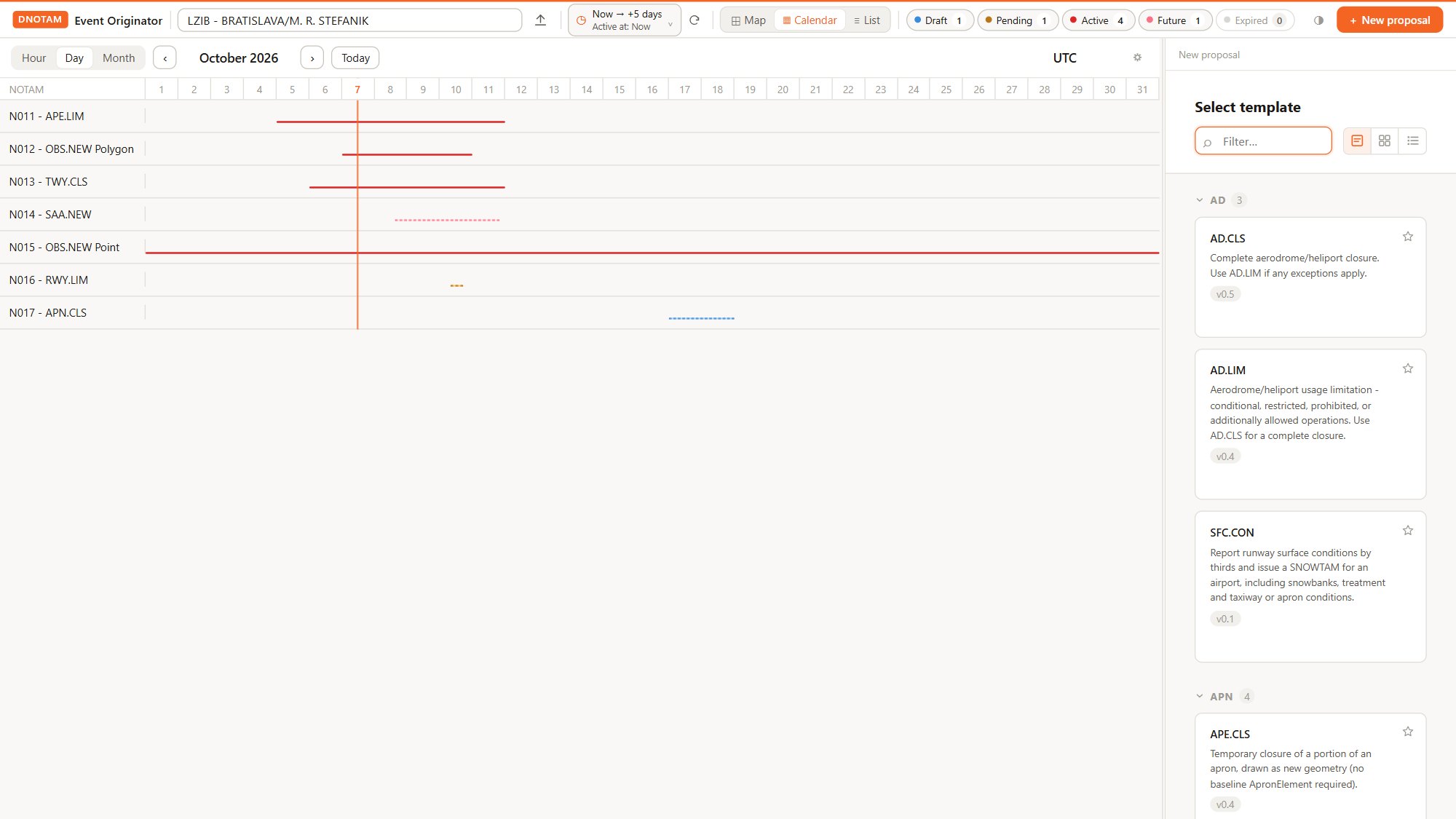
Operators pick a scenario from a searchable template catalogue and complete a guided form. They select the affected aeronautical features, enter geometry, validity periods, schedules and operational conditions, and the application takes care of the AIXM structure and the NOTAM wording.
All scenarios of the EUROCONTROL Digital NOTAM Event Specification 2.0 are supported, applying the corresponding data requirements and AIXM encoding rules. Additional templates cover simplified variants of common scenarios, such as closing a single runway direction or reporting an obstacle as a point, line or polygon, so operators fill in only what the situation needs.
Beyond the standard catalogue, additional custom scenarios can be added simply by configuring new templates. Custom events can be published as Digital NOTAM and NOTAM, or kept for local use only, for example for internal planning or coordination. For anything not covered by a template, a free-form event template keeps the information in the same workflow.
Automated NOTAM and SNOWTAM Text Generation
Conventional ICAO-format NOTAM text is generated from the structured event data, including the Item Q qualifiers and Items A to G. Text generation applies scenario-specific production rules and configured local conventions, keeping the digital event and its text representation consistent.
- Q-codes, traffic, purpose, scope, vertical limits and the Q-line circle are derived automatically
- One event can produce several NOTAMs when it affects more than one FIR or aerodrome
- Item D schedules are generated from the event timesheets, with daylight saving rules configurable per FIR
- Permanent (PERM) and estimated (EST) end times are supported
- SNOWTAM generation for runway surface condition reports, assessed by runway thirds with runway condition codes, contaminant coverage and depth, and automatic replacement of earlier reports
- Live preview of the generated text while the form is being completed
Generated messages remain subject to the configured validation and approval process.
Interactive Mapping
An integrated map viewer shows the aeronautical baseline and all events, coloured by status. Users select affected features directly on the map and define the location and geometry of restrictions or obstacles, with coordinates captured automatically in the event form.
- Drawing of points, lines, polygons and circles, or typed coordinate entry in common formats
- Snapping to endpoints, midpoints, nodes, lines and perpendicular positions on existing features
- Picking of referenced features such as runways, taxiways or navaids directly on the map
- Automatic detection of affected FIRs and airspaces from the event geometry
- Configurable layers and background maps for different operational contexts
Automated Data Validation
Event information is checked against the aeronautical baseline and configured validation rules before submission. Checks include feature references, mandatory fields, value consistency and temporal conditions, for example verifying that a selected runway belongs to the specified airport.
- Conflicting changes are prevented: a new event cannot be raised on a feature with a pending update or cancellation
- Overlapping and out-of-order SNOWTAM reports are detected
- Revision conflicts are detected when events are updated or cancelled
- Detected errors and inconsistencies are highlighted in the form for correction
Configurable Workflow, Roles and Audit Trail
Proposals move through defined stages according to the organisation's procedures: draft, submission for review, approval and publication. Role-based access separates originators, reviewers and approvers, and every step is recorded.
- Workflow customisable to your procedures, with defined processing stages and mandatory transitions
- User and role management for originators, reviewers and approvers
- NOTAM office hand-off with recording of the response: published with NOTAM number and issue time, or rejected with a reason
- Per-scenario publication policy, for example direct publication on local approval
- Event history with a complete audit timeline and the AIXM of every version available for download
Complete Event Lifecycle
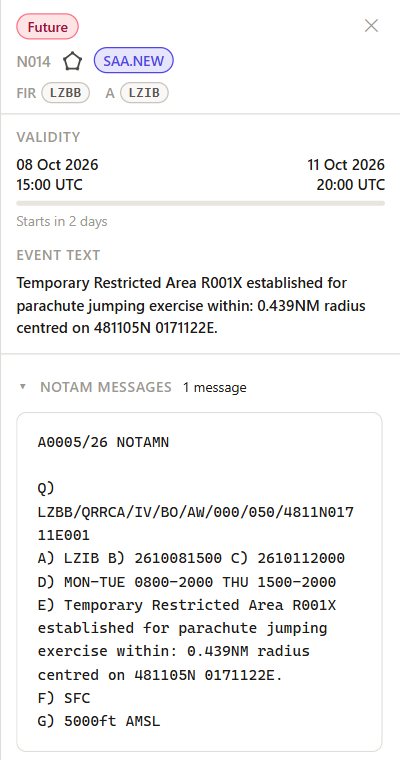
Published events stay under control until they end. Operators can change the end of an event, end an active event immediately or cancel a future one. Each change produces the correct AIXM replacement or cancellation data and the matching NOTAM text, previewed before it goes through its own approval and publication cycle.
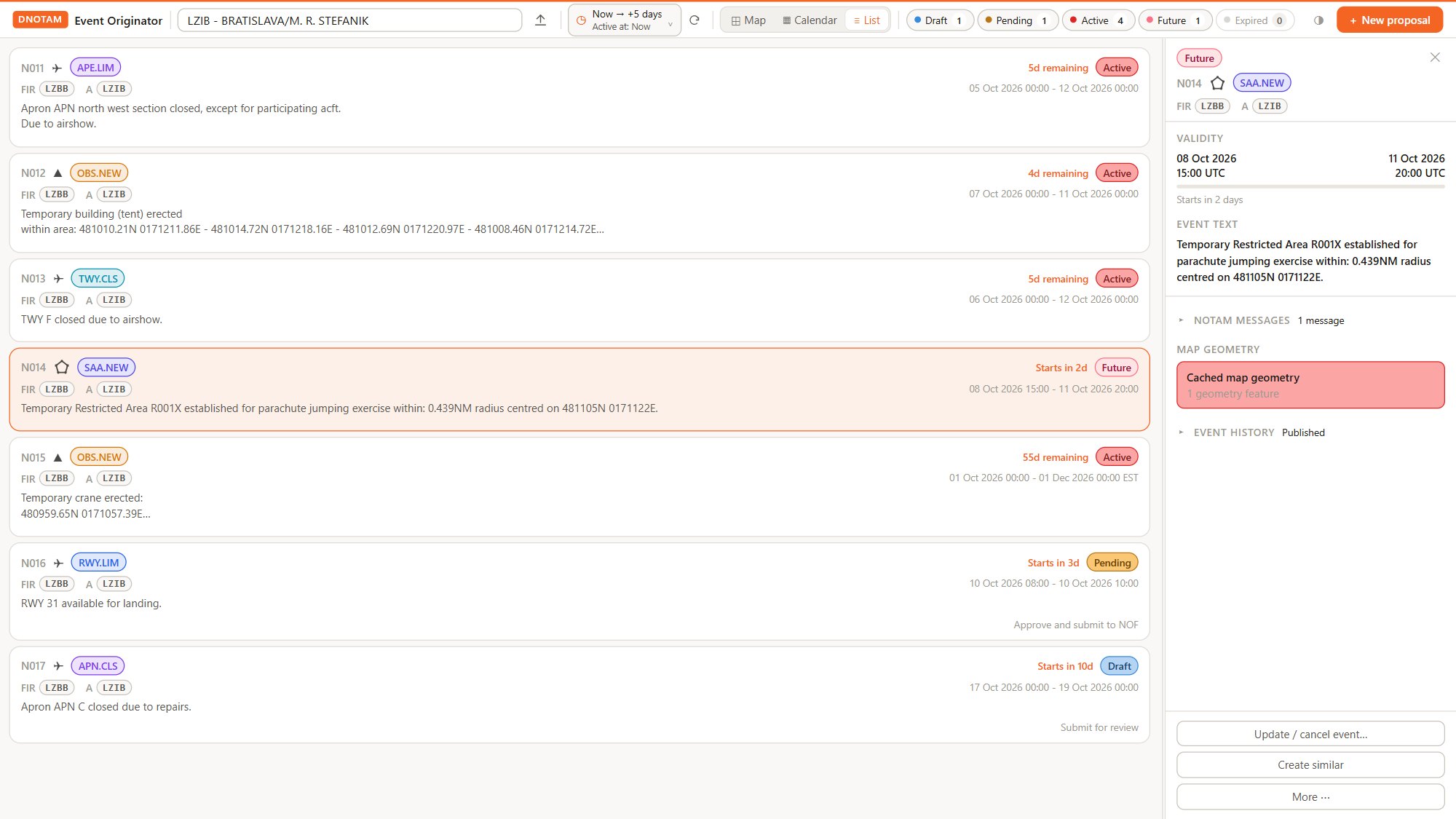
Temporal classifications such as Future, Active and Expired show at a glance when each event applies. A "Create similar" action speeds up recurring events.
Calendar, List and Map Views
Events can be explored on the map, in a list of NOTAM cards with status badges and countdowns, or on a calendar with hour, day and month timelines. A time window and an "active at" reference time let operators see exactly which events apply at any moment, now or in the future. Filters by airport, status and NOTAM code keep busy periods manageable.
Baseline Data Management
Events are always created against the current aeronautical baseline. The application loads AIXM 5.1 and 5.1.1 datasets and keeps them available between sessions.
- Baseline updates by full replacement or by adding and replacing changed TimeSlices
- Impact review before each update, showing which events reference changed or removed data
- Dataset browser for features, TimeSlices and their relations at any effective date
Configurable Event Templates
Scenario templates define mandatory and conditional fields, business rules, NOTAM production rules and the mapping of inputs to AIXM structures. They are created and maintained with Template Studio, part of the AIXM Origination Components, and deployed without rebuilding the application. Changes to local requirements and new event scenarios become a matter of configuration rather than software development.
AIXM Data Encoding
Structured event input is converted into AIXM 5.1.1 XML with the AIXM Event extension and the applicable GML geometry encoding, as required by the Digital NOTAM Event Specification 2.0. Encoding is performed by the AIXM Origination Engine and verified against reference examples for every scenario.
Distribution and Integration: SWIM, B2B and E-mail
Digital NOTAM events are exchanged through SWIM services, with built-in connectivity to EUROCONTROL AIMSL interfaces. Connection to existing national SWIM services requires service-specific configuration and, where necessary, integration work. Operational connectivity depends on the relevant service access, credentials and interface requirements.
Where SWIM is not yet available, proposals can be handed to the NOTAM office by e-mail, with the formatted NOTAM text and the AIXM file prepared automatically.
- SWIM services with built-in EUROCONTROL AIMSL connectivity
- Custom B2B interfaces to national NOTAM systems, AIM systems and partner services
- E-mail distribution with prepared NOTAM text and AIXM attachments
- Prepared for integration with existing systems, or for embedding Digital NOTAM origination into your own applications
Licensing and Deployment
Software as a Service (SaaS)
ANNEA hosts, operates and maintains the application using established global cloud providers with ISO 27001-certified services and independent SOC 2 assurance reports. The service includes security controls, backups and ongoing maintenance, with a 99.9% availability target subject to the agreed service-level terms.
On-Premises Deployment
The application can be deployed within your organisation's infrastructure and hosted, operated and maintained by your own team. Support and maintenance arrangements can be tailored to your requirements.
Integration
The application can operate as a standalone component or be closely integrated with existing systems and infrastructure. The scope and approach are tailored to each organisation's operational workflows, technical environment and integration requirements.
See It in Action or Try It Yourself. Book a live demonstration with our team, or request access to the demo version and explore the application at your own pace with prepared sample data. Once your access is activated, simply sign in to the Annea Apps Portal and start the application. Demo versions are intended for evaluation only.
Copyright
Annea s.r.o.